A place of your own for your people
🔒 Direct messages & channels end-to-end encrypted 🛡️ Privacy taken seriously

Chat, voice and organization on your own server.

GatherCore is a self-hosted gathering place for communities and small teams. No ad network, no third-party data, and no five different tools side by side. Direct messages and entire text channels can be end-to-end encrypted -- not even the server itself can read them.

The public instance is already running. GatherCore is still in beta.

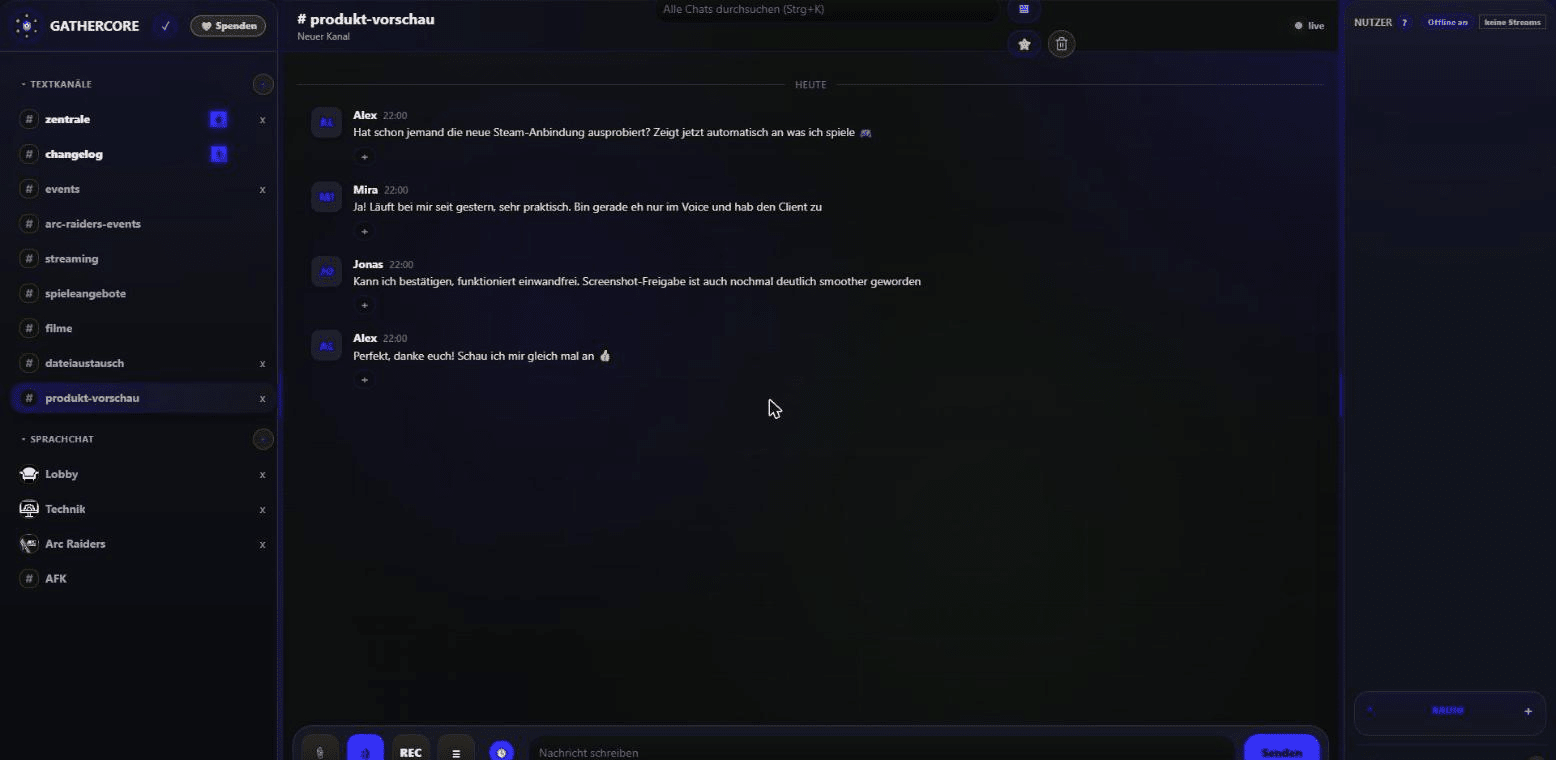
Real screenshot of the GatherCore interface: channel list and chat history

Real screenshot of the running beta · names are placeholders

Many communities spread their conversations, events, files and support requests across several services. That works – until permissions, responsibilities and data end up scattered in too many places.

GatherCore brings these things together in one clear interface. The server stays under your own control and can be adapted to your own group.

What's already in there

No future promises – just features that are already used in the running beta.

Chat and messages

Public text channels and direct messages share one interface. Messages stay findable in long conversations through search, replies and jump-to-message links. Direct messages -- and, optionally, entire text channels -- can be end-to-end encrypted, so even the server only ever sees ciphertext. Every channel can also keep a shared notes field for announcements or rules. A friend system with confirmation and a blocking feature round out who can message or call whom. You can also invite someone to a round of Tic-Tac-Toe or Connect 4 right from their profile.

  • 🔒 End-to-end encrypted DMs and channels
  • Direct messages and mentions
  • Replies, editing and reactions
  • Files, images, videos and voice clips
  • Channel search with jump-to-result
  • Pinned and saved messages
  • Media gallery and unread messages
  • Shared channel notes with history
  • Friend system with request and confirmation
  • Block users (no more DMs/calls)
  • Mini-games: Tic-Tac-Toe and Connect 4
  • "↓ New messages" jump when scrolled up
  • Status notices as a short banner at the top of the chat
  • Tidy bottom bar with a "⋯" menu for extras

Voice rooms

Voice channels run on LiveKit and can be used directly in the browser. Input and output devices as well as other participants' volume can be set individually. Your own voice activity over the last 14 days is available as a chart -- visible only to you.

  • Mic and output toggled independently
  • Device selection saved per user
  • Local volume per conversation partner
  • Automatic AFK channel on inactivity
  • Recording of an entire voice channel
  • Private voice activity stats

Screen and camera

Screen and camera sharing are tied to voice rooms. A viewer only gets counted once they actually open the stream.

  • Delivered via MediaMTX
  • Resolution, frame rate, codec and bitrate selectable
  • Live display of FPS, bitrate and loss
  • Viewer count shown right at the sender
  • Connection test before sharing
  • Fully operable in the browser

Events, calendar and files

Personal appointments and shared server events show up in one calendar view. Push reminders can be set with minute-level precision -- from 15 minutes to 30 days in advance -- and snoozed for an hour right from the notification. For larger files there's a dedicated exchange area alongside chat attachments.

  • Private appointments, own account only
  • Server events invite all members
  • Minute-precise push reminders with snooze
  • @mention auto-invites the person
  • Announcement in the linked event channel
  • Dedicated file and media area

Support and moderation

Issues can be reported as a local server ticket or a system-wide ticket. Moderators only get the tools they've been explicitly granted.

  • Tickets: open, in progress, closed
  • Assigned handler is shown
  • Moderation reports jump straight to the message
  • Timeout, voice kick, mute and unmute
  • Separate permissions for moderators and support
  • Audit log for administrative changes

Administration and operations

The dashboard bundles technical and organizational administration. Operators see at a glance whether GatherCore and its required services are reachable.

  • Role matrix with four fixed roles
  • Health status for LiveKit and MediaMTX
  • Backups, restore and updates
  • Server rules, branding and invite links
  • Storage, users, streams and open tickets
  • Warnings and failed logins

Streaming

A dedicated OBS plugin (stream relay) can send just a single source or scene to explicitly approved members, independent of recording and streaming. An overlay link shows the members of your voice channel, including who is speaking, right in your stream, and an "I'm live" button notifies friends and approved viewers the moment you're actually broadcasting.

  • Stream relay plugin for a single source/scene
  • Sharing only with selected members
  • Voice-channel overlay for your streaming software
  • "I'm live" notification to approved viewers
  • Social profiles and live indicator in the member list

Gaming and community

Thanks to game detection, GatherCore knows who plays what -- and turns that into something shared. "Who's playing?" finds teammates in one click: everyone who has played the game gets notified, the card in chat shows who's in, and it takes you straight into the right voice channel. When someone in a voice channel starts a game, the bot announces it in that channel's chat (can be turned off). Profiles automatically collect badges for voice time, playtime, loyalty and more, and a small server mascot grows with the community's activity.

  • "Who's playing?" calls with notifications
  • Teammate card with "I'm in" and voice join
  • Game-start announcement in the voice chat
  • Automatic badges on profiles
  • Server mascot that grows with the community
  • Per-game playtime statistics

Windows client and overlays

A dedicated native Windows client overlays running games without needing a browser open. Its FPS display measures real frame rate purely passively via Windows' own event tracing (ETW) -- no injection into the game process, so no anti-cheat risk. If the client isn't connected but a Steam profile is linked, GatherCore automatically picks up whatever game you're currently playing.

  • FPS display without process injection
  • Freely configurable crosshair overlay
  • Clock overlay while gaming
  • Your own freely positioned HTML dock
  • Voice chat member list as an overlay
  • Android app also available
  • Automatic game detection via Steam, no client needed

Personal settings

Many display and audio options belong to the user, not the server. That means the same instance can be set up differently on desktop and mobile.

  • Custom background and accent intensity
  • Font size, chat density and sidebars
  • Start channel and dock position
  • Notification sounds toggled individually
  • Audio and stream profile per account
  • Manage active devices and sessions
  • Personal dock as a floating window with custom CSS

AI features

A few spots in day-to-day use where AI briefly helps out -- always only on an explicit click or a direct question, never automatically in the background. Missed a long conversation? Get a precise summary as proper prose on demand, not just a terse bullet list, optionally read aloud too. Recorded voice-channel clips (only with everyone present consenting) get automatically transcribed and feed into the summary as well, so what was actually said is captured too. Right-click an image in chat and the AI explains what's in it -- also readable aloud. The GatherCore Bot also has a server memory: ask it via direct message or an @mention in a channel something like "When did we last play ARC Raiders?" and it answers from the chat history, playtimes and events -- using only what the person asking, or that channel, is allowed to see anyway.

  • AI summary for text and voice channels
  • Summary as prose, not a bullet list
  • Selectable time window (default: last hour)
  • Spoken summary with a real audio player
  • Automatic transcription of consented voice recordings
  • Explain an image via right-click
  • GatherCore Bot with server memory (DM and @mention)
  • Encrypted and admin channels are always excluded

Security and privacy aren't an afterthought

Concrete decisions, not just a claim -- here's what it actually means.

🔒 End-to-end encryption for DMs and channels

Once both people have been online at least once, direct messages are automatically encrypted with ECDH (P-256) and AES-GCM. Entire text channels can be encrypted the same way: a shared channel key gets individually wrapped for every member. The keys are generated and stay in the browser -- the server only ever handles ciphertext.

🛡️ No IP addresses shown to others

IP addresses are never displayed or transmitted to other users -- not even to administrators. Server-side tracking exists solely for abuse prevention and never leaves the server toward a browser.

✉️ Email is only for account recovery

Registration asks for an email address -- solely so a forgotten password can be reset. It's never shown publicly, never used for newsletters or marketing, and there's no data matching with third parties.

🚫 No ad network, no tracking

GatherCore doesn't load third-party analytics or ad scripts. What happens on your server stays on your server.

🎙️ Voice recording only with consent

The REC button first asks everyone in the voice channel for permission (25 seconds to respond). Recording only starts once everyone has explicitly agreed, a red banner shows it's running to everyone, and anyone can object at any time -- even someone who joins later.

🧩 Captcha with no third party

The human check during registration is a simple, self-hosted math puzzle -- no Google reCAPTCHA, no hCaptcha, no external keys or requests to someone else's server.

🤖 AI features: only on click or question, external provider

Summaries, image explanations, translation and questions to the GatherCore Bot are the only places that deliberately use an external service -- and only when actively clicked or when the bot is asked. End-to-end encrypted content never reaches it. Never automatically in the background, and the content sent is not stored for it.

The server is part of the solution

GatherCore is designed to run on your own Linux server. That way, data, access and settings all stay in one place.

Simple for members

The most important features run directly in the browser. No mandatory desktop client required.

  • Responsive interface
  • Guest access available
  • Personal settings per account

Transparent for operators

The admin dashboard shows not just user counts, but also the status of the services you depend on.

  • LiveKit and MediaMTX monitored separately
  • Backups and updates built in
  • Fine-grained roles and permissions

The pricing model for running your own instance hasn't been finalized yet and will be added here once it's decided.

Where GatherCore fits in

Not a pitch against existing tools – just the plain question of who ends up owning the server and the data.

Criterion GatherCore Discord Slack
Hosting Your own server Discord's cloud Slack's cloud
Who owns the data The server operator Discord Inc. Salesforce
Advertising None In part None (paid plans)
End-to-end encryption (DMs and channels) Yes, automatic No No
Chat, voice, screen share Yes, built in Yes Yes (Huddles)
Events & calendar Built-in calendar Bots/extensions only Integrations only
Support ticket system Built in Bots only Integrations only
Health monitoring for operators Admin dashboard with live status Not provided Not provided
Windows overlay with FPS display Yes, no anti-cheat risk (ETW) No No
Moving from an existing server No automatic import, rebuilt from scratch – –

As of 2026, and subject to change as any of the listed services evolve.

Frequently asked questions

What people usually want to know before trying it out.

What does GatherCore cost?

The pricing model for running your own instance hasn't been finalized yet. The public beta instance can already be tried for free.

Is the source code open?

That hasn't been decided yet. This page will be updated once the licensing model is settled.

Can I move my existing Discord or Slack server to GatherCore?

No, there's no automatic import for that right now. A GatherCore server is set up from scratch – channels, roles and permissions are configured by hand.

What do I need to self-host GatherCore?

Your own Linux server. The most important features then run directly in the browser – a desktop client isn't required for members.

Can admins read my direct messages?

No, as long as both sides have been online at least once: direct messages are then automatically end-to-end encrypted (ECDH P-256 + AES-GCM), and the key never leaves the browser. Neither administrators nor the server itself can read the content. The same encryption can be turned on for entire text channels too. One thing to know: there's no multi-device sync -- a second device can't retroactively decrypt content already encrypted elsewhere.

Where does my community's data live?

On your own server. GatherCore is self-hosted – there's no central third-party service that messages or user data pass through.

How mature is GatherCore right now?

GatherCore is in beta: usable and in daily use, but still under active development. Individual features may still change.

Beta means:
usable, but not finished yet.

GatherCore is under active development. Features may change, and some things can still be a bit rough around the edges. Feedback from real-world use flows directly into the next versions.

What's changed recently

Live from the running instance's changelog – updates automatically with every release. Entries are currently written in German only.

Loading changelog …

See GatherCore for yourself.

The running instance opens directly in your browser – as a guest first, if you like.

Open the app